
Blog
Intune Training: Master Real-Time Endpoint Management with Microsoft Intune Device Query
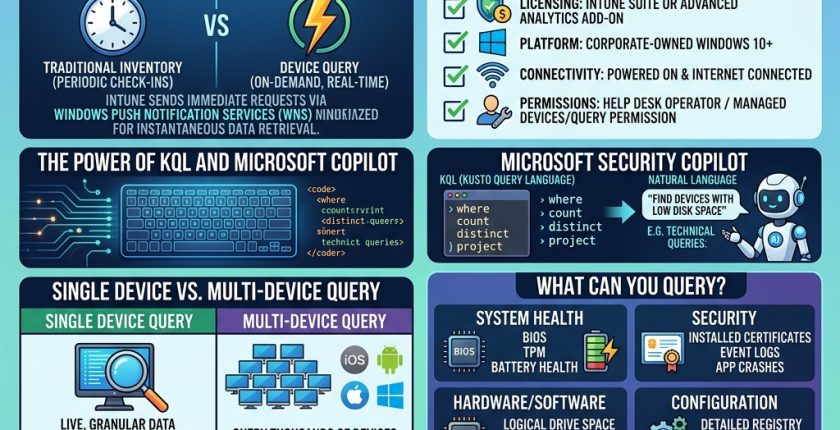
The modern IT landscape demands instant visibility. A security breach can occur in seconds, making real-time monitoring essential. Microsoft Intune Device Query provides this by offering on-demand, interactive data for managed endpoints. It acts as a proactive command center, bridging the gap between standard device check-ins.
What Is Device Query?
Standard IT processes often rely on device check-ins that occur every few hours. This delay hides critical inventory or compliance data. Device Query solves this by using Kusto Query Language (KQL) to request real-time data. When you run a query, Intune uses Windows Push Notification Services (WNS) to reach the device instantly. Results typically appear in seconds.
Prerequisites for Success
To use this feature, your organization must meet several requirements:
-
Licensing: You need the Microsoft Intune Suite or the Intune Advanced Analytics add-on.
-
Platform Support: It works on corporate-owned Windows 10 or later devices.
-
Join Type: Devices must be Microsoft Entra joined or hybrid joined.
-
Enrollment: Devices must be managed by Intune and enrolled in Endpoint Analytics.
-
Permissions: You need the “Managed Devices/Query” permission, often found in the Help Desk Operator role.
Query Types
There are two main ways to use this tool:
-
Single Device Query: Accessed via the Monitor section of a specific device, this provides granular, live data. It functions like a remote version of Windows Task Manager.
-
Multi-Device Query: This allows you to query thousands of devices across Windows, iOS, Android, and macOS simultaneously. Note that this data usually refreshes daily, unlike the real-time single-device view.
Powerful Use Cases
You can query a wide array of entities to troubleshoot or secure your environment:
-
System Health: Check BIOS information, TPM status, and battery health.
-
Security Auditing: Investigate Windows Event logs, check installed certificates, or verify security patches.
-
Real-Time Monitoring: View active network connections, local user accounts, and running processes.
-
Configuration Checks: Confirm policy deployments by inspecting specific registry keys or file versions.
Leveraging Security Copilot
Not comfortable with KQL? Microsoft Intune integrates natively with Microsoft Security Copilot. You can describe your goal in natural language—for example, “Find all devices with low disk space”—and Copilot will generate the KQL query for you. This significantly reduces troubleshooting time for support engineers.
Operational Boundaries
To maintain service stability, Microsoft enforces these limits:
-
Frequency: You are limited to 15 queries per minute.
-
Data Caps: Result strings are capped at 128kb, and query inputs cannot exceed 2,048 characters.
-
Connectivity: The device must be powered on and connected to the internet. If a firewall blocks WNS, the query will fail.